> For the complete documentation index, see [llms.txt](https://docs.definest.ai/llms.txt). Markdown versions of documentation pages are available by appending `.md` to page URLs; this page is available as [Markdown](https://docs.definest.ai/copy-trading-bot/bot-settings..md).
# Bot settings.
## **Creating a New Bot/Wallet**
1. Click the blue **Add trading wallet** + button.
2. Come up with a name for your wallet/bot.
3. If you want to import your already created wallet, paste the Private key and click **Import wallet**.\
\
If you want to create a new wallet, simply click **Generate a new wallet**.
4. Choose a network from the dropdown (Ethereum, Solana, etc.).
5. If you choose **Generate a new wallet**, make sure to copy and securely store the Address, Private Key, and Mnemonic of the new wallet.
6. The wallet is created; click **Next**.
## **Bot Settings**
Next, you will proceed to the settings for the created bot.
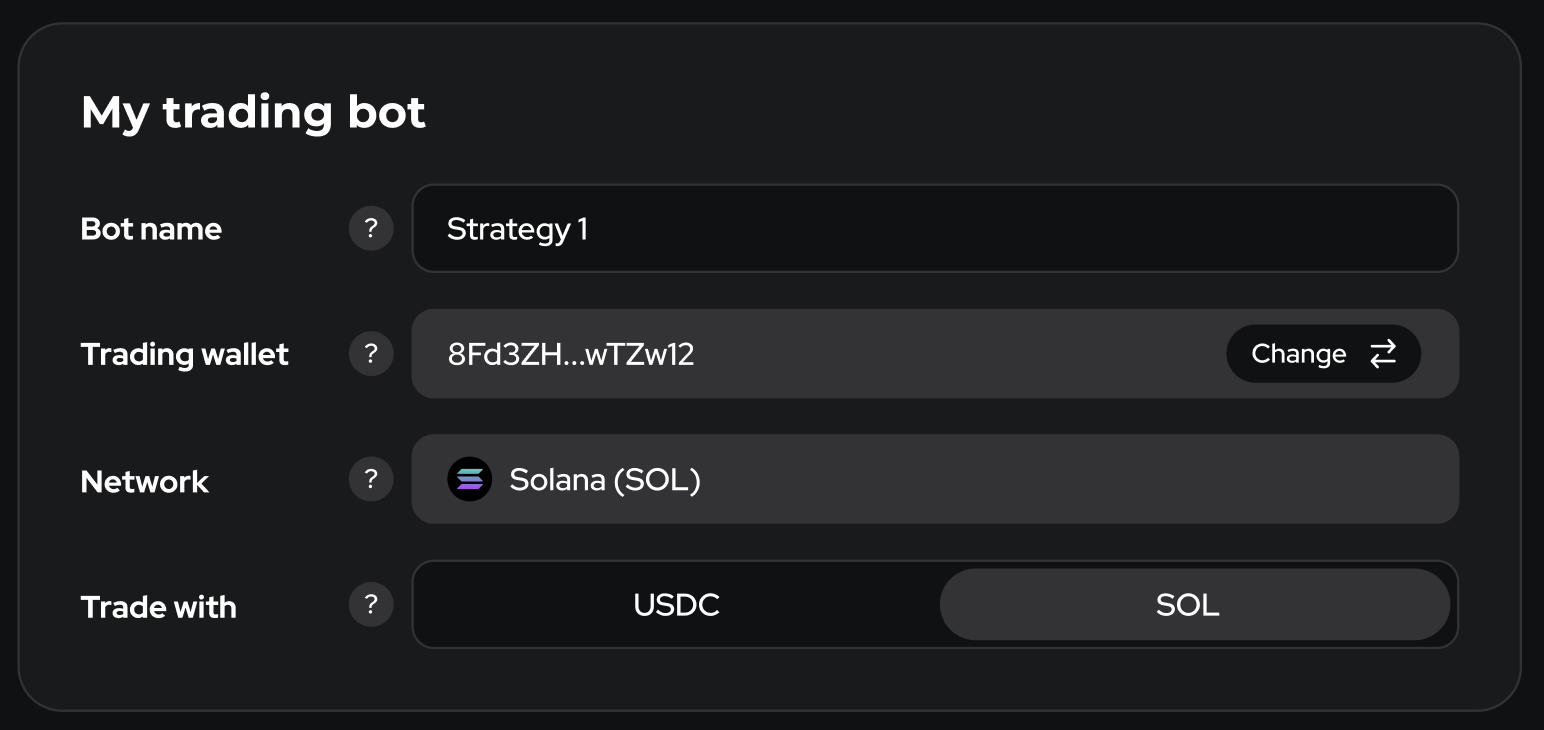
## My trading bot
* **Bot name** - Any name to help you identify this bot.
* **Trading wallet** - The wallet this bot uses to trade and hold funds. You can change it at any time using the Change button.
* **Network** - The blockchain network where this bot operates.
* **Trade with** - selects the quote currency the bot uses (per network).
* Solana: USDC or SOL
* Ethereum: USDT or ETH
When you switch it:
* Orders are placed as TOKEN/USDC or TOKEN/SOL on Solana, and TOKEN/USDT or TOKEN/ETH on Ethereum.
* All amounts and limits in Buy and Advanced are interpreted in the selected quote currency.
* The bot spends the matching wallet balance (USDC/USDT/ETH/SOL). The \~ … hints show the approximate value in the other currency.
* There’s no auto-conversion — if you don’t have enough of the selected currency, the trade won’t execute.
* It affects: Buy amount (Min/Max), Dupe buy amount (Min/Max), Max position per trade (Max position / Min buy amount).
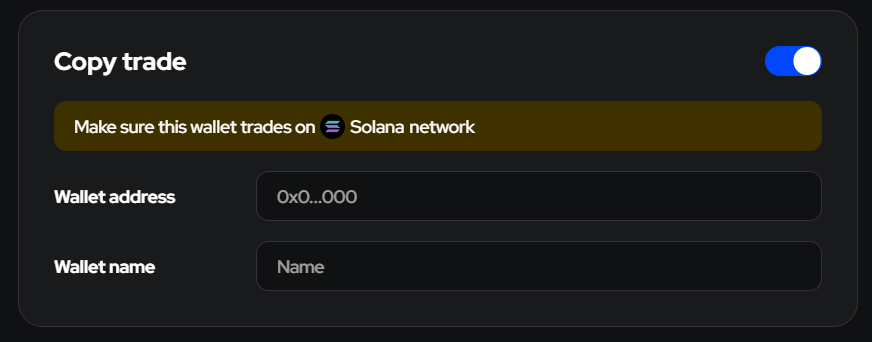
## Copy trade
* **Wallet address** - The address of the wallet you will be following (to copy its trades).
* **Wallet name** - Come up with a name for the wallet you will be following.
## Buy
### Copy Buy
This is the main setting that enables copying purchases from the original wallet. If this setting is turned off, the bot will not make any purchases.
{% hint style="success" %}
Enable this setting for the bot to be able to buy tokens.
{% endhint %}
### Dupe Buy
If this setting is enabled, the bot is allowed to buy additional amounts of a token that has already been purchased (i.e., there is an open trade).
### Buy percentage
Buy Percentage is a parameter that determines the portion of funds allocated to purchasing cryptocurrency when copying the trades of the original wallet. It allows traders to adjust the size of their investments relative to the trades made by the original wallet.
**Min/Max Values:** From 1% to 1000%. This means that a trader can invest from 1% to 1000% of the amount that the original wallet spends on purchasing a specific asset. Additionally, the purchase amount cannot be less than Min ETH and more than Max ETH.
Buy Percentage allows you to control how aggressively or conservatively you want to follow the original wallet. For example, if the original wallet invests $1,000 in buying Bitcoin and your Buy Percentage is set to 100%, you also invest $1,000. If your Buy Percentage is set to 200%, you invest $2,000, doubling your exposure compared to the original wallet. However, it’s important to note that the purchase amount cannot be less than Min ETH and more than Max ETH, ensuring that you adhere to the minimum and maximum investment limits set by your platform.
### Buy amount
Specify the Minimum and Maximum amounts for the first purchase in the token's native currency.
{% hint style="info" %}
The bot will purchase the same amount of currency as the original wallet, but no less than the Min and Max values you have set.
{% endhint %}
Please note that sometimes smart contracts have restrictions on the maximum purchase amount for newly created tokens. If you exceed this limit, a purchase error will occur.
### Retry times
In case of an error during a purchase, the bot will attempt to buy the token as many times as specified here.
Recommended value for Ethereum: 10.
Recommended value for Solana: 2. Max: 5.
### Copy Gas (ETH)
When enabled, the gas amount for your purchase will include the gas used by the original wallet in the copied purchase.
### Copy Priority Fee (SOL)
When this option is on, the bot uses the priority fee paid by the original wallet plus the extra amount you entered in the *Priority Fee* field.
{% hint style="success" %}
**Final priority fee** = **Original wallet’s priority fee** + **Your added priority fee.**
{% endhint %}
### Copy Bribe (SOL)
When this option is on, the bot uses the bribe (validator tip) paid by the original wallet plus the extra amount you entered in the *Bribe* field.
{% hint style="success" %}
**Final bribe** = **Original wallet’s bribe** + **Your added bribe.**
{% endhint %}
{% hint style="warning" %}
Note: Copy Bribe is available only in Anti-MEV and Max Speed execution modes.
{% endhint %}
### Gas Delta (ETH)
Gas delta will act as the maximum priority gwei for ETH Type-2 transactions. Essentially, the bot will automatically adjust to the current average gas value and then add the chosen Gas Delta on top of it.
Example:
* Average gas usage is 10 gwei
* If you set Gas Delta to 3 gwei, the gas price for your transaction will now be 10 (base) + 3 (priority) gwei.
Higher deltas will result in faster transaction speeds at the cost of higher gas fees.
### Priority Fee (SOL)
A priority fee is a extra amount of SOL you add to the normal network fee so Solana validators pick your transaction first.
Example:
* Normal fee: 0.02 SOL
* You add Priority Fee: +0.01 SOL
* Total cost: 0.03 SOL
Higher priority fees speed up confirmation but cost more.
### Bribe (SOL)
A bribe is an extra tip (in lamports) you attach to a Solana transaction so validators give it the best possible position in the block, helping you avoid front-running.
{% hint style="warning" %}
**Note: Bribe is available only in Anti-MEV and Max Speed execution modes.**
{% endhint %}
Example:
* Normal fee: 0.02 SOL
* Priority Fee: +0.01 SOL
* Bribe: +0.05 SOL
* Total cost: 0.08 SOL
Higher bribes improve ordering and reliability but increase cost.
### Slippage
Slippage is the difference between the expected price of a trade and the actual execution price, expressed in both absolute values and percentages.
Slippage can be expressed as a percentage of the expected price, indicating how much the price changed at the moment of trade execution compared to what you planned.
Example: Expected price for buying a token: $100. Actual purchase price due to slippage: $120. You overpaid 20% due to slippage.
Min/Max values: from 0 to 99%.
**Recommended values:**
* If this is a low-liquidity new token and you want to ensure its purchase in the first minutes after trading starts, set Slippage to 90%.
* If you are following a trader who is trading medium to high liquidity coins and the purchase cost is extremely important to you, limit Slippage to 20%.
### Execution mode
Execution mode defines how transactions are sent to the network, balancing speed, cost, and MEV protection.
#### Solana
* **Standard** *(slow, cheap) -* The cheapest option. Transactions are sent via the default route with low priority. No bribe required and no MEV protection.
* **Anti-MEV** *(fast, expensive, safe) -* The safest option. Transactions are routed through MEV-protected paths to reduce frontrunning and sandwich attacks. Faster than Standard, but more expensive. Minimum bribe: 0.001 SOL.
* **Max Speed** *(fast, cheap) -* The fastest option. Transactions are delivered through multiple parallel routes to maximize speed and the chance of block inclusion. This mode prioritizes speed and cost efficiency. MEV protection may apply in some cases, but it is not guaranteed. Minimum bribe: 0.0002 SOL.
#### Ethereum
* **Standard** *(fast, cheap) -* The cheapest option. Transactions are sent normally and are slightly faster than Anti-MEV.
* **Anti-MEV** *(slower, cheap, safe) -* The safest option. Transactions are sent using MEV-protected routes to reduce the risk of frontrunning and sandwich attacks. Slightly slower than Standard.
#### How to choose
* Use Standard for low-cost, non-critical actions.
* Use Anti-MEV when protection from MEV is more important than cost.
* Use Max Speed on Solana when execution speed and block inclusion matter most.
### Buy token once
If this setting is enabled, the bot will only be able to purchase any token once during its operation.
### Max active buys per token
Sets a cap on the number of open buy entries for the same token across all trades on this bot. Applies to all buys—copied, manual, and auto. When the cap is reached, any new buy is skipped until one entry is sold/closed. Leave blank for no limit.
**Example:**
Set to 3. You already have three open buys in TOKEN (across two trades). A new buy signal arrives (copied/manual/auto) → the bot skips it until one of the three entries closes.
### Platforms (SOL)
Platform — choose the decentralized exchanges (DEXes) on which the bot is allowed to trade.
### Dupe buy amount
Specify the Minimum and Maximum amounts for subsequent purchases in the token's native currency.
{% hint style="info" %}
The bot will buy the same amount of currency as the original wallet, but no less than the Min and Max values you have set.
{% endhint %}
### Skip new trade
Checks the leader’s current USD balance of the token whenever a new entry appears. If it’s above your threshold, the bot skips opening a new trade. Leave blank to disable. Does not affect add-on buys inside an existing trade.
**Example:**
Threshold $5,000 → the leader buys TOKEN while already holding $6,200 of TOKEN → skipped (no new trade). Later their balance drops to $2,800; on the next fresh entry your bot may open a new trade (subject to your Buy limits).
### Max dupe buy times
This is the maximum number of additional purchases. If you set Max dupe buy times to 2, the bot will be able to make a total of 3 purchases of the token: the first purchase and 2 additional purchases.
### Max Position per Trade
#### Max Position per Trade
Hard ceiling on how much the bot may hold inside one trade (first buy + any re-buys).
#### Min Add Buy
Minimum *remaining gap* that must still be available **under the Max ceiling**.
If the free gap is **smaller** than this value, the bot skips the next buy.
If the gap is **bigger or equal**, the bot is allowed to fill it **even with a buy that is smaller than your regular Min Buy Amount**.
{% hint style="danger" %}
**Min / Max value (Min Add Buy)**
* Minimum: 0.00005 SOL, 0.000002 ETH
* Maximum: no upper limit
{% endhint %}
{% hint style="success" %}
**Priority rule:**\
Min Add Buy overrides Min Buy Amount.\
• Remaining gap ≥ Min Add Buy → the bot may buy that gap (even if it is below Min Buy Amount).\
• Remaining gap < Min Add Buy → order skipped.
{% endhint %}
**Example:**
Settings
* Max Position = $500
* Min Buy Amount = $50
* Min Add Buy = $5
| Situation | Remaining gap to the cap | Action |
| -------------------------------------- | ------------------------ | --------------------------------------------------------------------------- |
| Position = $440 → signal to buy $100 | $60 | Bot buys $60 (trimmed). $60 ≥ Min Buy Amount so normal trim. |
| Position = $492 → signal to buy $100 | $8 | Bot buys **$8** even though $8 < Min Buy Amount, because gap ≥ Min Add Buy. |
| Position = $499.9 → signal to buy $100 | $0.1 | **Skipped** – gap ($0.1) < Min Add Buy ($5). |
**Result:** the position never exceeds $500, and the bot ignores any order if the leftover room is smaller than Min Add Buy.
### Retry Slippage (SOL)
Retry Slippage is the maximum price deviation allowed when the bot retries opening a trade. Do not confuse it with regular [Slippage](https://docs.definest.ai/copy-trading-bot/bot-settings#slippage).
### Fee reserve
**Fee reserve (native only)**\
Keep a small amount of the network’s native coin (SOL, ETH) untouched so you can always pay fees. Works only when trading in the native coin. Leave empty to disable.
**Min native to keep (SOL/ETH)**\
Minimum native balance to preserve. If a buy would push your native balance below this floor, the bot trims the order; if even a minimal spend would breach it, the buy is skipped.
**Min buy amount (above reserve) (SOL/ETH)**\
A buy executes only if the free native balance above the reserve is at least this amount; otherwise the buy is skipped.
**Example (Solana):**
* Wallet balance: 1.00 SOL
* Reserve (Min native to keep): 0.30 SOL
* Min buy amount (above reserve): 0.05 SOL
* Requested buy: 0.80 SOL
* Trim calculation: free above reserve = 1.00 − 0.30 = 0.70 SOL → order trimmed to 0.70 SOL
* Check: 0.70 SOL ≥ 0.05 SOL → buy executes
* Edge case: if free above reserve were 0.03 SOL, the buy would be skipped
### Market cap
Market cap = price × total supply of a token. Use Min / Max to include only wallets that trade tokens whose market cap falls within your range. This helps focus on micro-caps, mid-caps, or larger, more established tokens. If a token’s market cap can’t be read, the If unknown option lets you either ignore this filter or skip that token.
**Example**
* Set Min = $5,000,000, Max = $50,000,000.
* The finder will surface wallets whose recent trades involve tokens between $5M–$50M market cap.
* Tokens outside the range are excluded. If If unknown = Skip token, trades with missing market-cap data are also excluded.
### Liquidity
Liquidity of a coin refers to the ability of the cryptocurrency to be bought or sold quickly on the market without significantly affecting its price. A coin with liquidity of $10 million has a more stable price and allows for larger trades without substantial impact on its price, unlike a coin with liquidity of $100,000.
The lower the liquidity, the higher the slippage, and vice versa.
### Token Age
This is the lifespan of the coin at the moment of purchase. By limiting the minimum and maximum lifetime of a coin, you can choose which coins to buy. If you want to purchase only recently launched coins, set Max CoinLifetime to 120 minutes (2 hours) or 1440 minutes (24 hours).
### Max Tax
This is the maximum allowable commission for buying and selling the coin. In many new coins, the commissions can reach up to 35% in the first few minutes. However, if the coin takes off, these fees will be offset since you bought the coin earlier and at a better price.
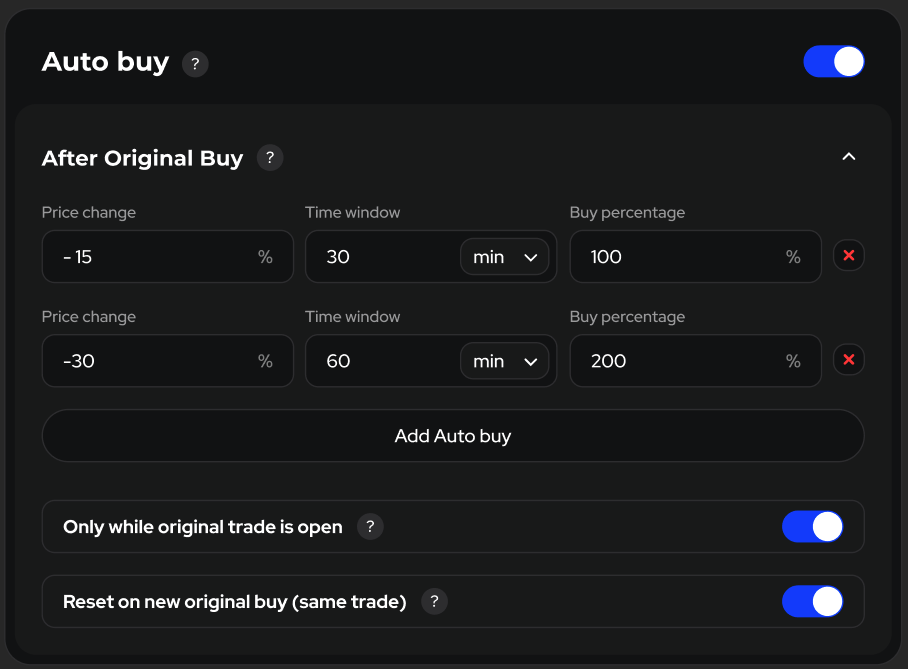
## Auto buy
Automatically places a buy when a configured trigger is met.
* The Auto buy block appears when Copy trade is ON.
* It’s OFF by default; settings inside are locked until you toggle it ON (same behavior as Auto sell).
* Auto buy can work even if Copy buy is OFF—your Buy settings still apply.
### After Original Buy
Rules here anchor to the original wallet’s executed price and track the market for a chosen Time window.
* Each rule can fire once per original buy and uses its Buy percentage for size.
* You can add multiple rules; they evaluate independently.
\---
* Price change — percent from the original wallet’s *execution price*.
Use −X% for dips (buy the drop) or +X% for breakouts (buy the rise).
* Time window — how long that price move must occur (min / h / d).
* Buy percentage — order size = Buy percentage × your base Buy amount (range 1–1000%).
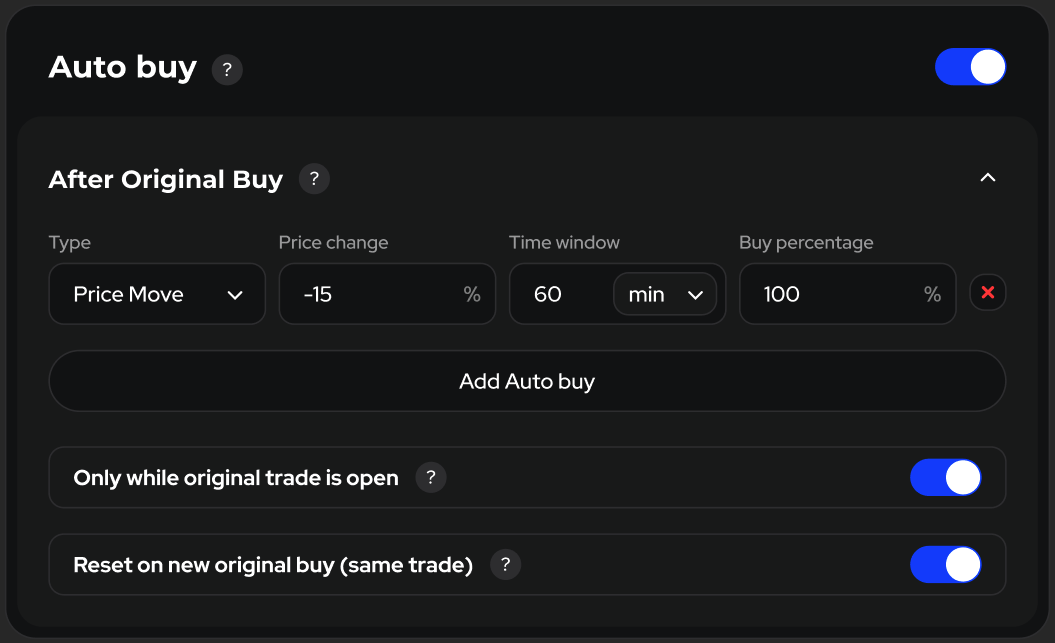
### Price Move
#### Trigger
Buy if price changes by ±X% from the original price within the Time window (min / h / d).
Use −X% for dips (buy the drop) or +X% for rises (buy the breakout).
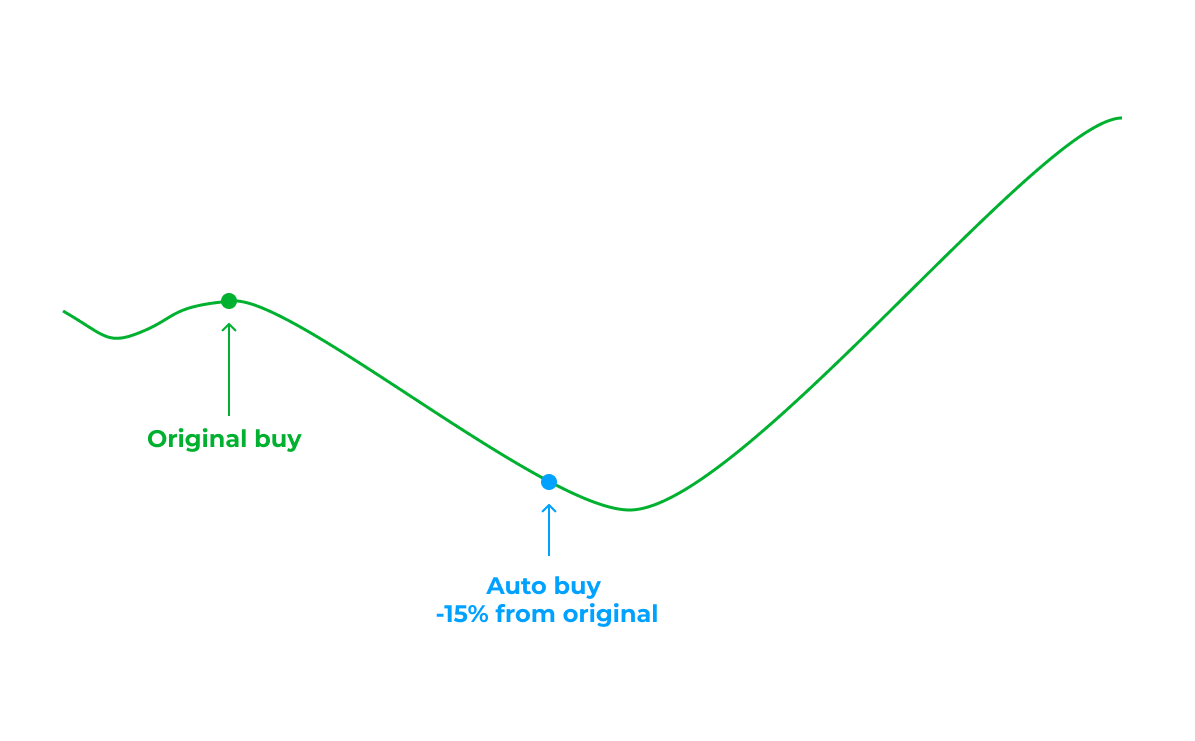
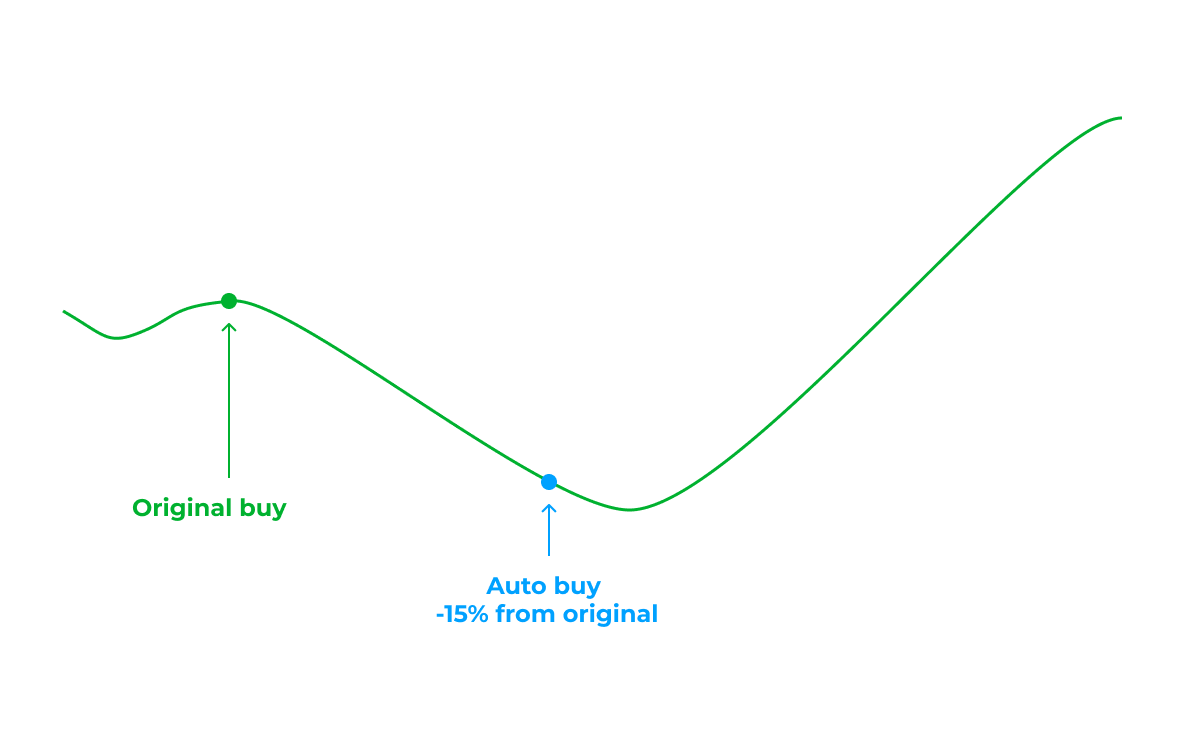
#### Example
* Price change: −15%, Time window: 60 min, Buy percentage: 100%.
* Flow: original buys → price hits −15% within 60 min → one auto-buy executes immediately
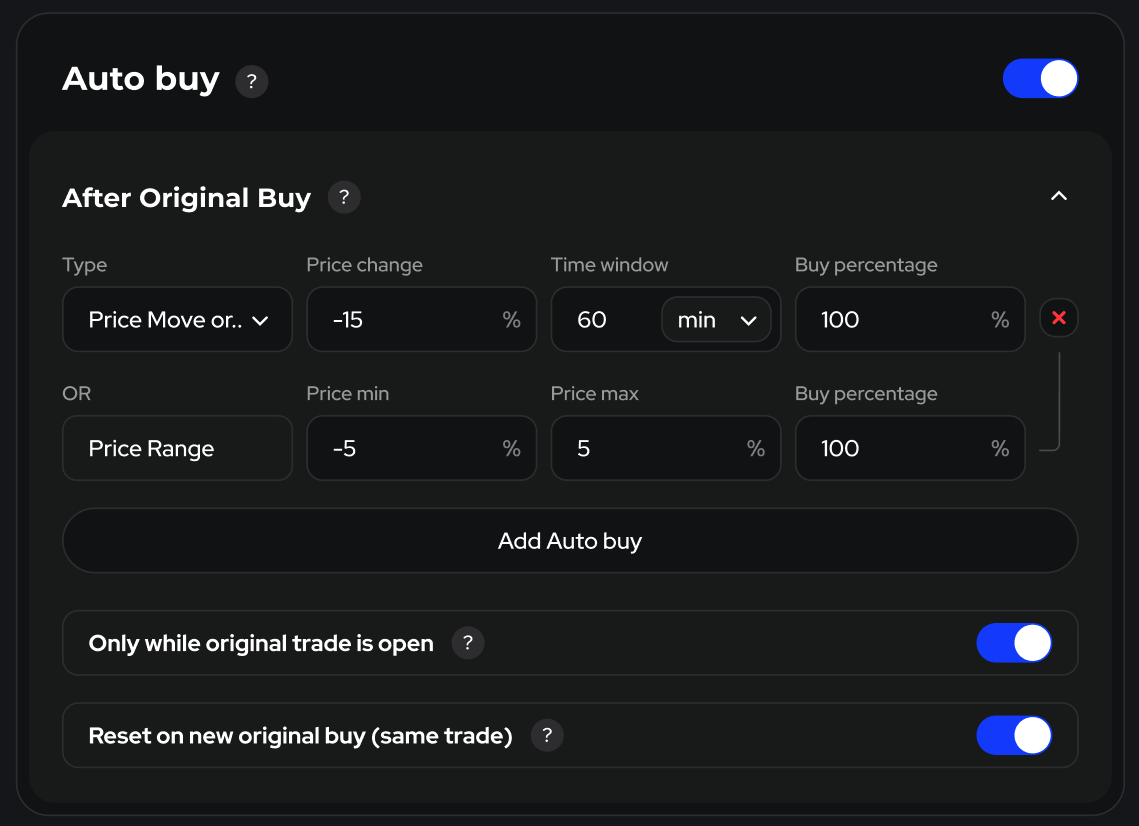
### Price Move or Range
An auto-buy rule that triggers on either of two conditions within the same time window:
* Price Move: price reaches ±X% from the original wallet’s executed buy price.
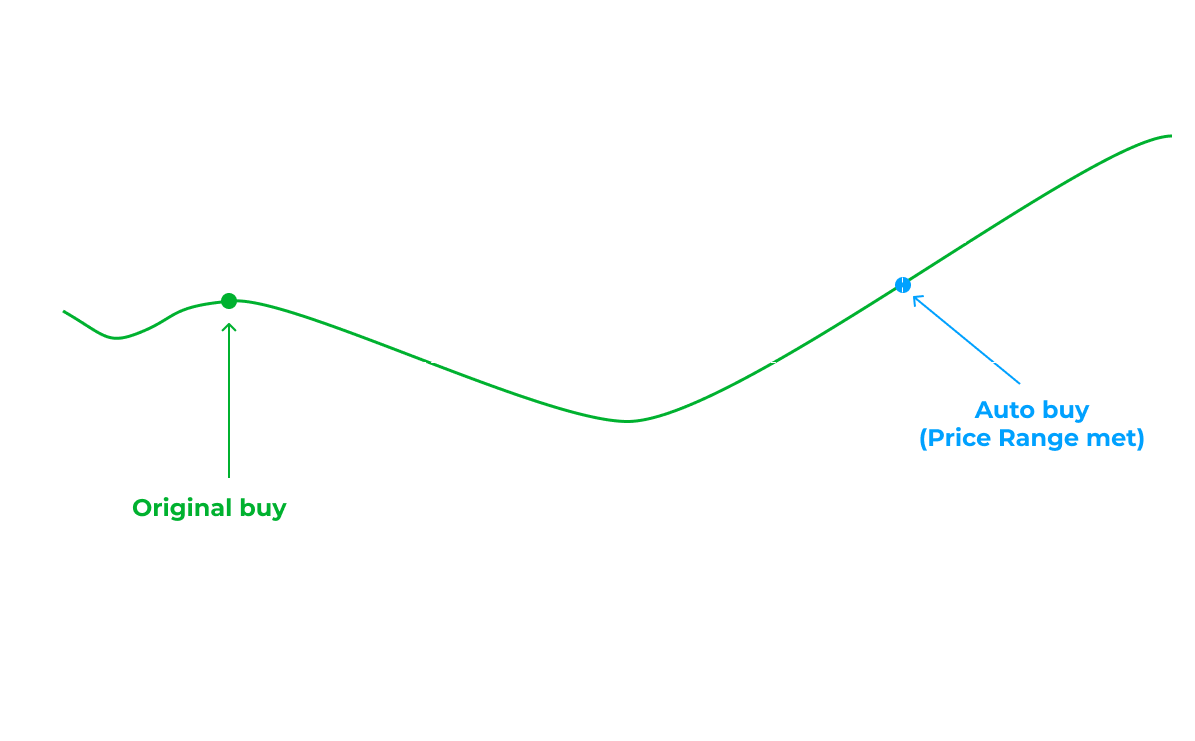
* Price Range: by the end of the window, price is between *Price min* and *Price max* (both in % from the original buy).
Each rule fires once per original buy and sizes the order by Buy percentage. It respects your Buy limits (amounts, caps, budgets, dupe rules, slippage, etc.).
#### **How it works (fields)**
* Price change (±X%) — threshold for the Price Move condition.
* Time window — how long the rule watches the move/range (min / h / d).
* Buy percentage — order size = % × your base Buy amount.
* Price min / Price max — bounds for the Range check at window end (inclusive).
#### Examples
Settings:
* *Price change = −15%*
* *Time window = 60 min*
* *Price min = −5%*, *Price max = +5%*
* *Buy percentage = 100%*.
1. **Triggers by Price Move (dip hit −15%)**
* Price falls to −15% anytime within 60 minutes → auto-buy executes immediately.
2. **Triggers by Price Range (ends inside band)**
* Price never hits −15% during the window, but at 60 minutes it sits between −5% and +5% → auto-buy executes at window end.
3. **No auto-buy**
* Price never hits −15%, and at 60 minutes it’s outside −5%…+5% → rule does not fire.
Notes
* The two conditions are joined by OR: the first to qualify wins.
* One auto-buy per original buy event. Further behavior depends on “Only while original trade is open” and “Reset on new original buy (same trade)”.
### Only while original trade is open
If ON, the auto-buy triggers only while the original wallet still holds the token during the window. If the original closes the trade, the trigger is cancelled. Turn OFF to allow triggering even after the original closes.
### Reset on new original buy (same trade)
If ON, whenever the original adds another buy in the same trade, any active window from earlier buys is cancelled and a fresh window starts from the latest buy. Turn OFF to keep earlier windows active (multiple auto-buys may fire).
**Flow:** Base Buy amount = $100. The original buys at $1.00. Price drops to $0.85 within 30 minutes → the bot places one auto-buy for $250 (250% of base), respecting your Buy limits/reserve/caps. If the original closes before −15% is reached, the trigger is canceled. If the original buys again in the same trade, the 30-minute window resets from that new buy and the previous window is discarded (because Reset… ON).
### Notes
* Percent is measured from the original’s executed price, not from your average.
* All protection from Buy applies to Auto buy (amount min/max, caps, dupe buy limits, budgets).
* Each auto-buy appears in your trade history as a separate buy made by your bot.
## Sell
### Copy sell
This is the main setting that enables copying sales from the original wallet. If this setting is turned off, the bot will not sell anything.
{% hint style="success" %}
Enable this setting for the bot to be able to sell tokens while following the original wallet.
{% endhint %}
### Retry times
In case of an error during the sale, the bot will attempt to sell as many times as specified here.
Recommended value for Ethereum: 20.
Recommended value for Solana: 2. Max: 5.
### Copy Gas (ETH)
The concept is the same as [mentioned earlier](https://docs.definest.ai/copy-trading-bot/bot-settings#copy-gas-eth).
### Copy Priority Fee (SOL)
The concept is the same as [mentioned earlier](https://docs.definest.ai/copy-trading-bot/bot-settings#copy-priority-fee-sol).
### Copy Bribe (SOL)
The concept is the same as [mentioned earlier](https://docs.definest.ai/copy-trading-bot/bot-settings#copy-bribe-sol).
### Gas Delta (ETH)
The concept is the same as [mentioned earlier](https://docs.definest.ai/copy-trading-bot/bot-settings#gas-delta-eth).
### Priority Fee (SOL)
The concept is the same as [mentioned earlier](https://docs.definest.ai/copy-trading-bot/bot-settings#copy-priority-fee-sol).
### Bribe (SOL)
The concept is the same as [mentioned earlier](https://docs.definest.ai/copy-trading-bot/bot-settings#copy-bribe-sol).
### Slippage
The concept is the same as [mentioned earlier](https://docs.definest.ai/copy-trading-bot/bot-settings#slippage).
### Anti-MEV
The concept is the same as [mentioned earlier](https://docs.definest.ai/copy-trading-bot/bot-settings#anti-mev).
### Round up to 100%
If the original wallet sold 95% of the purchased tokens, your bot will also sell 95% by default when Copy Sell is enabled. This setting allows you to round sales up to 100%.
Simply specify the percentage at which to round up to 100% (to sell the entire position).
### Scheduled sell retries
Runs only after the bot’s normal sell retries fail. Applies to all non-manual sells; manual sells are excluded.
{% hint style="info" %}
**Retry times: 1–10 (leave blank to disable). Retry every: 1–1800 sec (default 30 sec).**
{% endhint %}
Each scheduled retry fires after the set interval (then repeats on the same interval), uses the same sell logic and standard retries, and respects your limits (balance, fee reserve, slippage, etc.). Retries stop on success, when the position is closed/zero, or when the retry limit is reached.
**Example:**
* Settings: Retry times = 3; Retry every = 300 sec (5 min)
* Attempts: T+5m, T+10m, T+15m
* Outcome: if any attempt succeeds, later attempts are canceled
## Approve (ETH)
Approving a token is the process in the blockchain where you grant permission to a smart contract or decentralized application (dApp) to use a certain amount of your tokens. In simpler terms, you allow the application access to your tokens for a specific purpose.
### Auto approve
{% hint style="success" %}
Make sure to enable this setting for the bot to be able to sell your tokens.
{% endhint %}
### Retry times
In case of an error while executing the Approve, the bot will attempt to execute it as many times as specified here.
Recommended value: 4.
### Gas Delta (gwei)
The concept is the same as [mentioned earlier](https://docs.definest.ai/copy-trading-bot/bot-settings#gas-delta-gwei).
Recommended values: 1 or 2 GWEI.
## Auto sell
This setting allows the bot to automatically sell your tokens based on Stop-loss, Take-profit, and Time-fix.
{% hint style="success" %}
Enable this setting for sales based on Stop-loss, Take-profit, and Time-fix.
{% endhint %}
## Take-profit
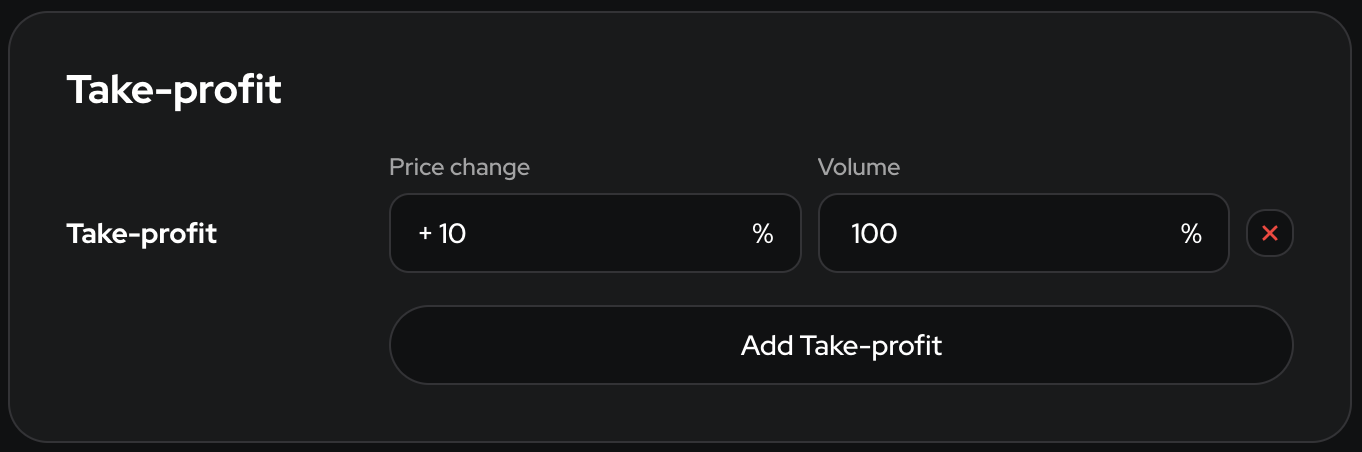
Take-Profit allows you to automatically secure profits when an asset’s price reaches a specified level. This helps prevent losing your gains due to sudden market changes and reduces the emotional impact on your trading decisions.
Example: You bought Bitcoin at $40,000 and set a Take-Profit at a 10% profit. When the price increases by 10% to $44,000, your position will automatically close, locking in a 10% profit.
In this example:
* Price Change - This is the price of the token at which the order to close the position is triggered.
* Volume - This is the percentage of tokens that will be sold when the Price Change is reached.
### Take-Profit Ladder
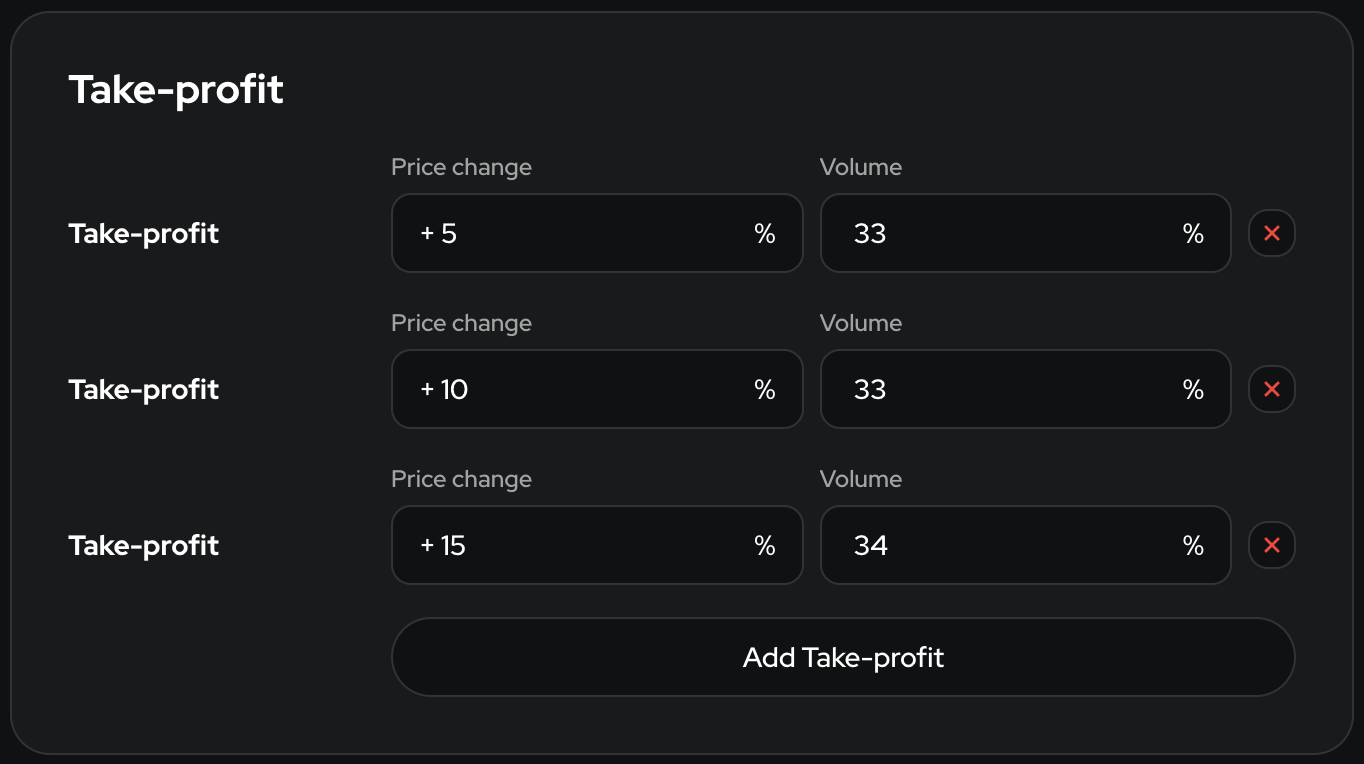
A Take-Profit Ladder helps secure profits in parts, reducing the risk of missing out on gains from further price movements. Instead of closing the entire position at one profit level, the trader closes it partially at each step of the ladder, allowing for gradual profit-taking while keeping part of the position open for potential further growth.
You bought Bitcoin at $40,000 and set three Take-Profit levels with gains:
* First Take-Profit at +5% profit ($42,000) — closes 33% of the position.
* Second Take-Profit at +10% profit ($44,000) — closes another 33% of the position.
* Third Take-Profit at +15% profit ($46,000) — closes the remaining 34% of the position.
When the price hits $42,000, the first part of the position closes with a 5% profit, at $44,000 the second part closes with a 10% profit, and at $46,000 the remaining part closes with a 15% profit.
## Stop-loss
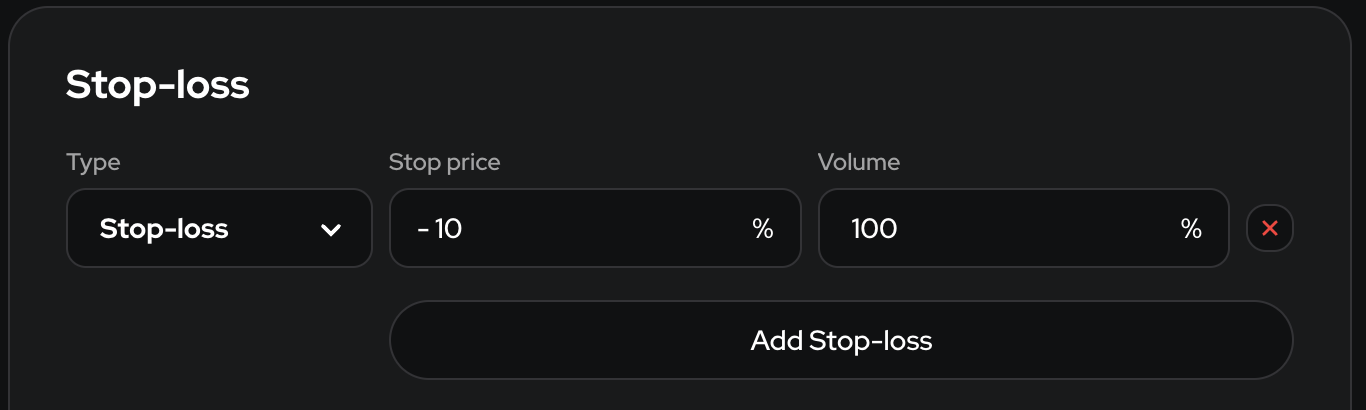
A stop-loss helps limit your losses by automatically closing a trade if the asset’s price moves against you. This protects your capital from significant losses and helps manage risk without needing to constantly monitor the market.
Example: You bought Bitcoin at $50,000 and set a stop-loss at a -10% loss. If the price decreases by -10% to $45,000, your position will automatically close, limiting the loss to 10%.
* Stop price - This is the price of the token at which the order to close the position is triggered.
* Volume - This is the percentage of tokens that will be sold when the Stop price is reached.
### Conditional Stop-loss
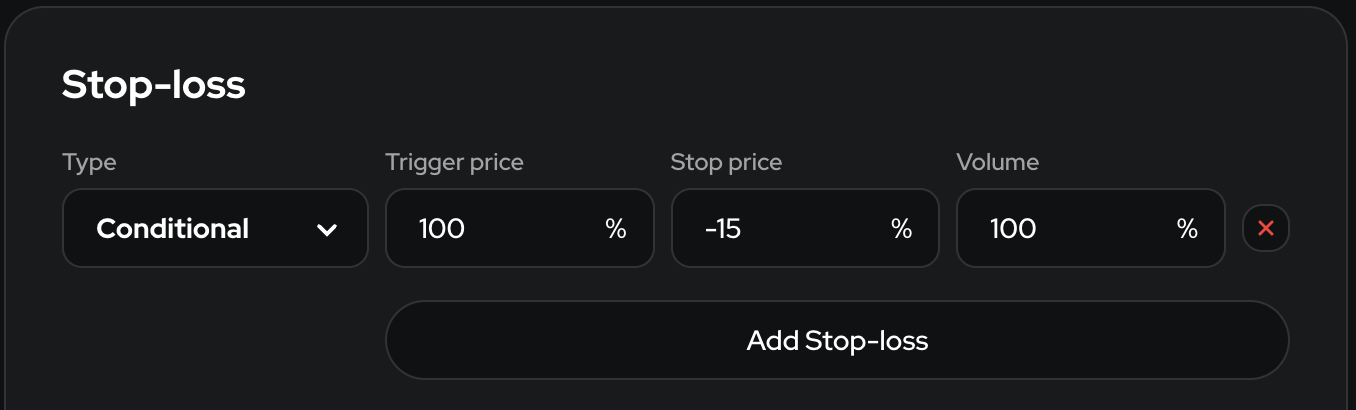
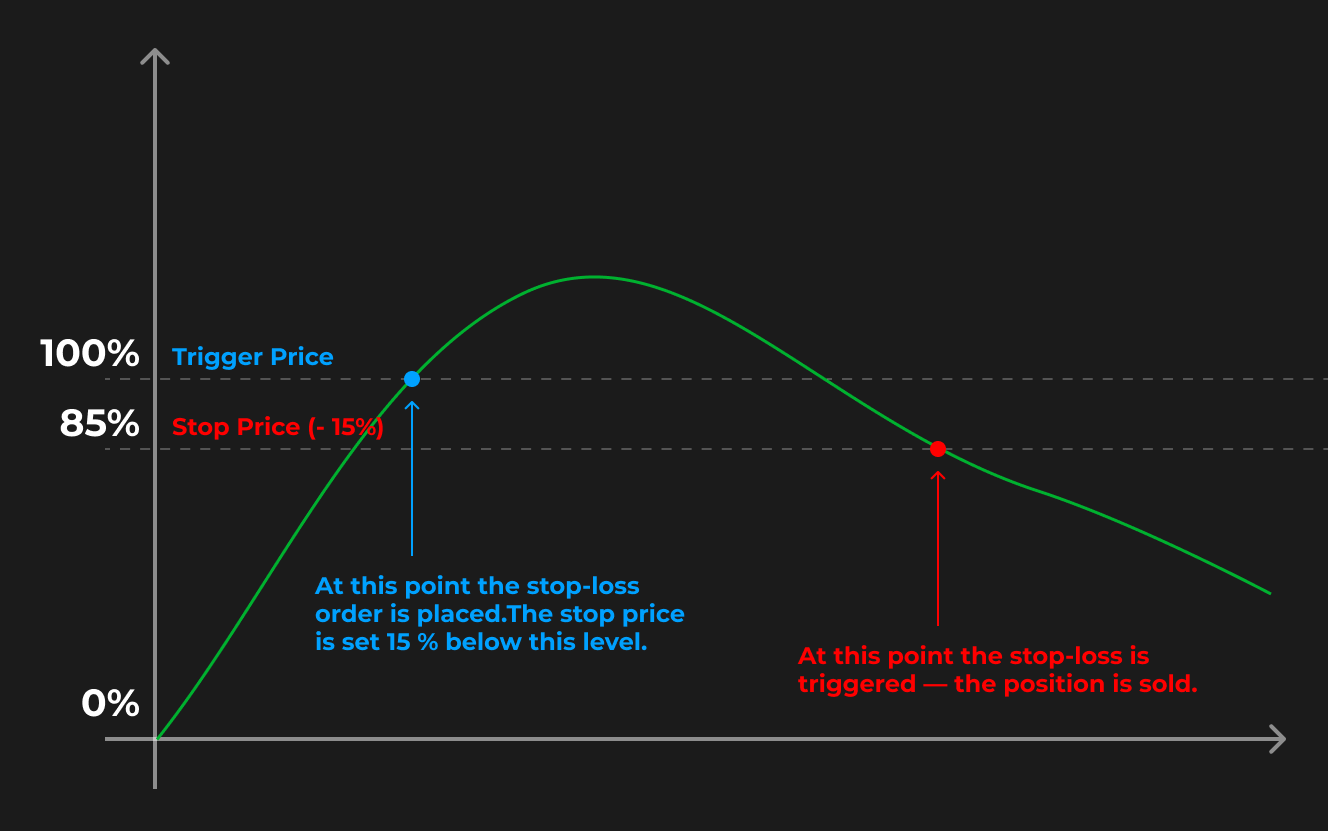
**Conditional Stop-Loss** is a type of order that automatically closes your position when certain market conditions are met. Unlike a regular stop-loss, which is activated immediately upon reaching a specified price, a conditional stop-loss is set at the Trigger price, and from that moment, it functions like a regular stop-loss, activating when the Stop price is reached.
**Conditional Stop-Loss consists of:**
* **Trigger Price** - This is the price level at which the Conditional Stop-Loss is activated and becomes a valid order.
* **Stop Price** - This is the price of the token at which the order to close the position is triggered. The Stop price is calculated from the Trigger price.
* **Volume** - This is the percentage of tokens that will be sold when the Stop price is reached.
**Example:** If the token price increases by 100% (doubles), a Stop-Loss will be set for a price change of -15% with the sale of all tokens. This type of stop-loss allows us to secure profits in case the token rises first and then begins to fall.
### **Stop-loss** Ladder
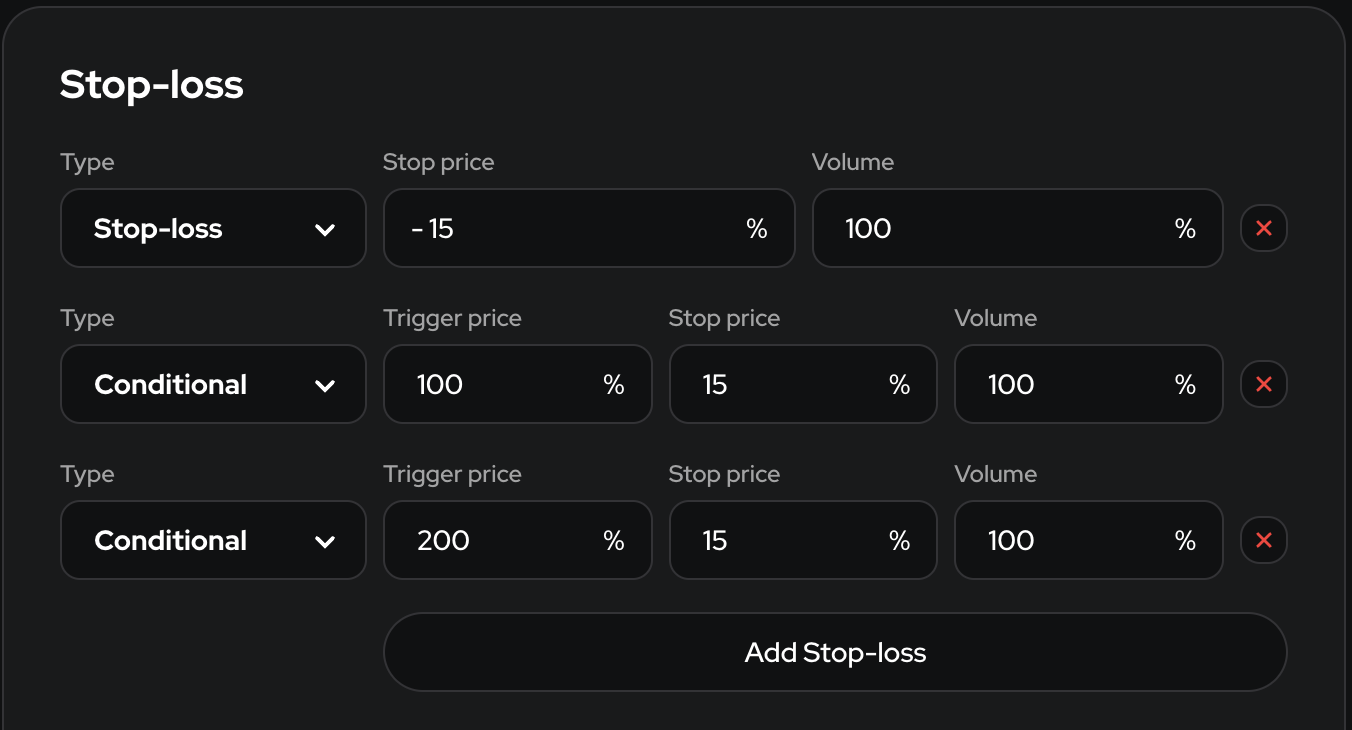
The stop-loss ladder allows you to distribute risk across multiple levels, reducing the likelihood of significant losses in the event of a sharp market movement against your position. Instead of setting a single stop-loss, you place several, which provides flexibility and better protection for your capital.
In the case of a Conditional Stop-Loss, the ladder can help increase your profits.
**Example:** Three stop-losses are set:
* The first stop-loss limits our losses if the price drops by 15% immediately after purchase. In this case, we will sell 100% of the position.
* The second stop-loss activates only when the price increases by 100% (doubles). If the price then drops by 15%, the bot will sell 100% of the tokens, securing an 85% profit.
* The third stop-loss is similar to the second but activates when the price reaches 200% (triples). If the price then drops by 15%, the bot will sell 100% of the tokens, securing a profit of 185%.
The number of stop-losses is unlimited. You can choose to sell not 100% of the tokens, but 1%, 5%, 10%, 30%, 50%, 85%, etc. It all depends on your trading strategy.
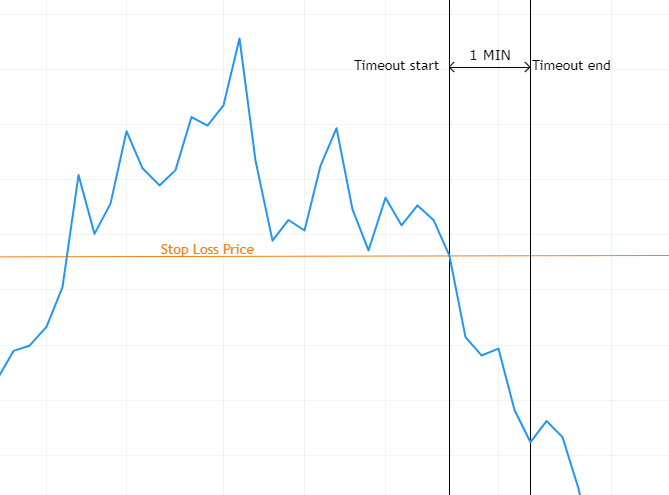
### Timeout
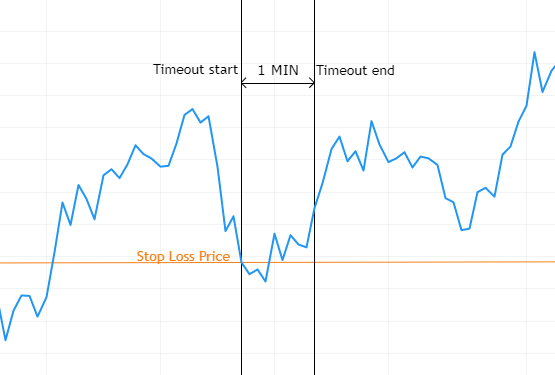
When the Stop Loss timeout option is enabled, the system will delay the execution of the trade for the specified amount of time (in seconds).
This is useful for preventing accidental stop-loss triggers due to temporary market fluctuations. If the price reaches the stop-loss level but quickly rebounds, the timeout allows the system to wait for confirmation of a sustained price movement before executing the order.
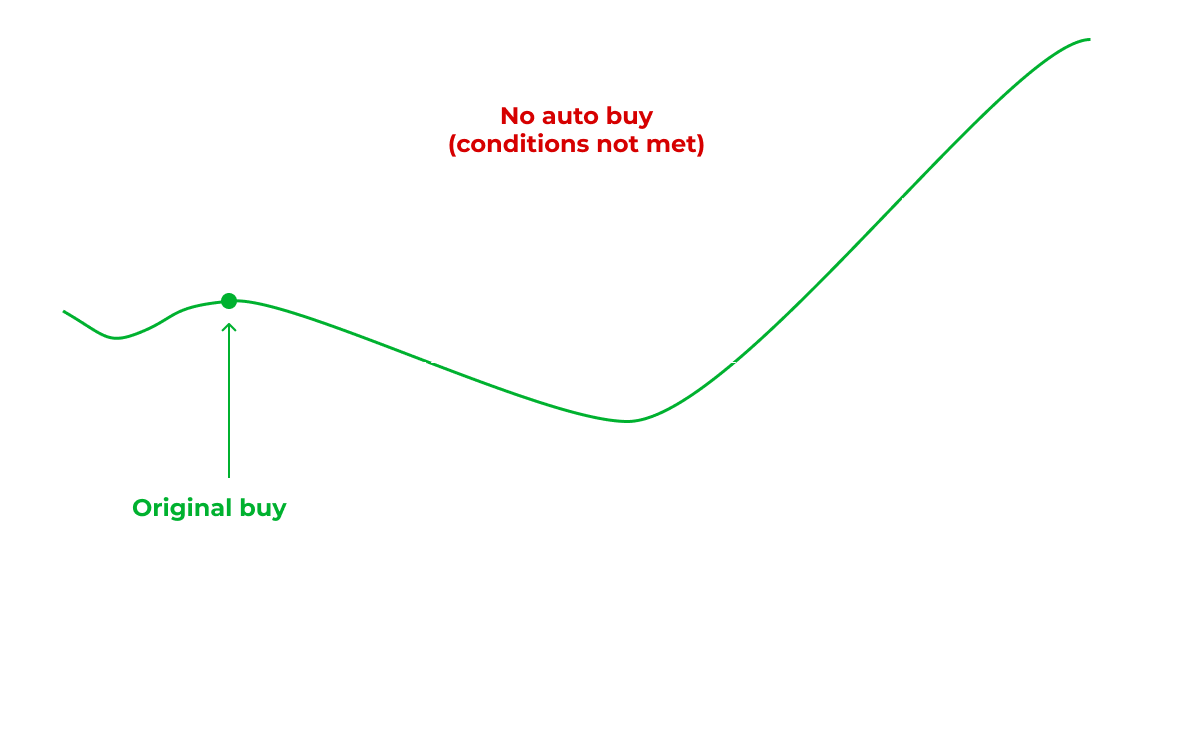
When the price drops to or below the stop-loss level you have set, the system will wait for the specified time. If, after this time has elapsed, the price is above the stop-loss price (as shown in the image below), the stop-loss order will not be executed, and the trade will remain open.
If, after the timeout expires, the price is still at or below the stop-loss price (as shown in the image below), the stop-loss order will be executed, and the trade will be closed.
The decision to execute the stop-loss order will be made only after the timeout has elapsed.
### Activate stop-losses after N buys
This setting delays the placement of stop-losses until the specified number of purchases has been made. If you set it to 2 buys, the stop-losses will only be placed after the bot has made 2 purchases in a single trade.
This can be useful when following frequently trading traders who may average down (buy more of the same token) multiple times during a token’s decline. Without this setting, your stop-loss may trigger too quickly, not allowing for averaging down.
### Don't dupe buy in this trade after the stop-loss
When this setting is enabled, any further purchases of the token will be prohibited after any stop-loss is triggered in this trade.
This can be useful when following frequently trading traders who may average down (buy more of the same token) multiple times during a token’s decline. Some traders may average down up to 30 times, investing 100% of their capital into one coin.
## Time-fix
Time-fix is a time-based sell trigger (alongside Stop-Loss and Take-Profit). Instead of reacting to price immediately, it waits for a set period and then sells a portion of the position.
**How it works**
* When the Time Delta elapses (counted from a chosen Time since anchor), the bot places a sell for Volume% of the current token balance.
* Each rule fires once; multiple rules (a “ladder”) sell from the remaining balance as they trigger.
* Uses the same sell logic as normal sells (limits, slippage, min amounts, fee reserve, scheduled sell retries, etc.).
### Standard Time-fix
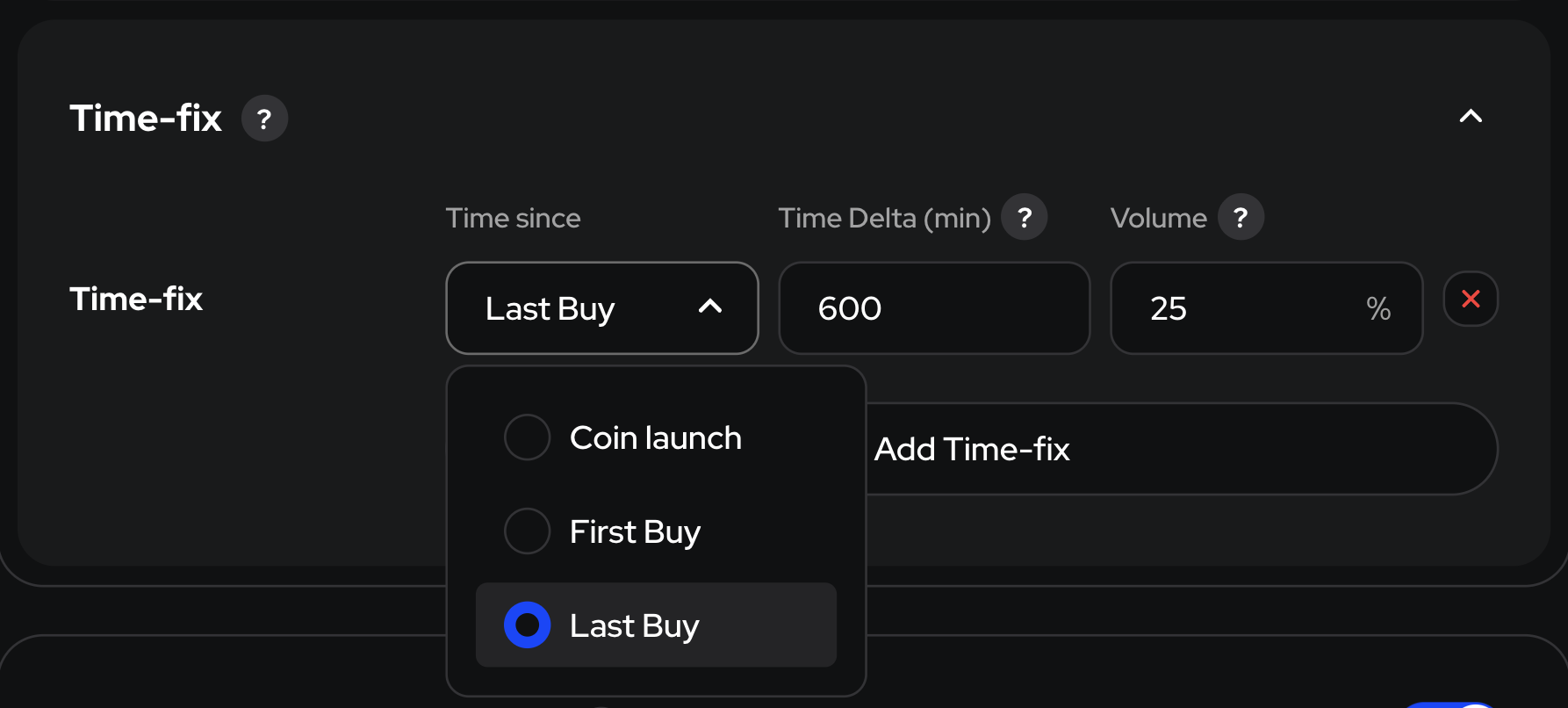
* Time since — the anchor point to start counting from:
* Coin’s launch: since the token’s first trades on chain.
* First Buy: since your first buy in this trade.
* Last Buy: since your most recent buy in this trade.
* Time Delta (min) — how long to wait.
* Volume (%) — how much of the position to sell when the timer ends.
Example
*Time since:* Last Buy • *Time Delta:* 600 min • *Volume:* 25% → After 10 hours from your last buy, sell 25% of the remaining tokens (regardless of price).
You can also use a Time-Fix ladder in accordance with your trading strategy.
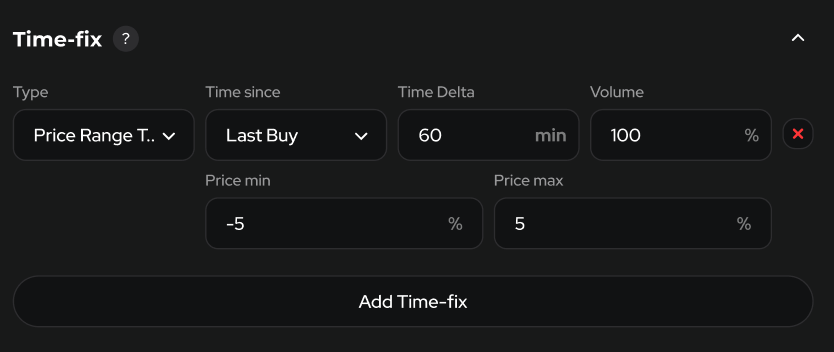
### Price Range Time-fix
Adds a price condition at the end of the timer: sell only if the price is inside a band around the anchor price.
**Extra fields**
* Price min (%), Price max (%) — acceptable change vs the anchor price (the price at the chosen *Time since*). Bounds are inclusive.
**When it fires**
* At Time Delta, if Price min ≤ percent change ≤ Price max, sell Volume%.
* If the price is outside the band, the rule does not sell.
**Example 1**
* *Time since:* Last Buy
* *Time Delta:* 60 min
* *Price min/max:* −5% … +5%
* *Volume:* 100%
→ After 60 min, sell 100% only if price is within −5% to +5% of your last-buy price.
**Example 2**
* Same settings, but price is +9% at 60 min
→ No sell (outside the band).
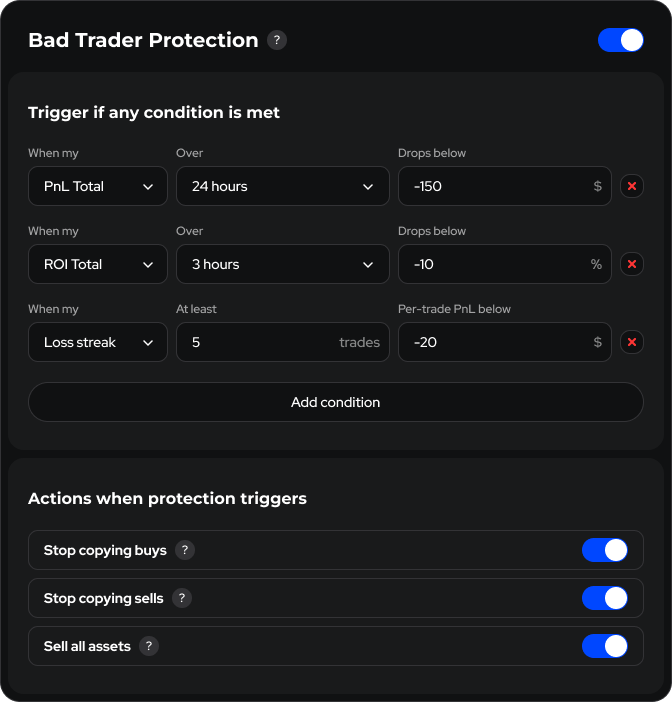
## Bad Trader Protection
Bad Trader Protection is a safety net that monitors your bot’s performance and—if any user-defined loss threshold is hit—automatically pauses copying or liquidates positions. Its goal is to stop you from following a wallet that has suddenly turned unprofitable.
### **Condition types**
| Indicator (dropdown) | What the trigger checks | Value range |
| -------------------- | -------------------------------------------------------------------- | ----------- |
| **PnL Total** | Total PnL falls below **X USD** within **T** | any USD |
| **PnL Realized** | Profit & loss from closed trades only | any USD |
| **ROI Total** | Overall return (open + closed trades) drops below **X** % in **T** | –100 % … ∞ |
| **ROI Realized** | Return on **closed** trades only | –100 % … ∞ |
| **WinRate Total** | Share of winning trades (open + closed) falls below **X %** in **T** | 0 % – 100 % |
| **WinRate Realized** | Share of winning **closed** trades | 0 % – 100 % |
| **Loss streak** | At least **N** trades in a row, each with PnL below **X USD** | N ≥ 1 |
{% hint style="warning" %}
**You can mix and match as many conditions as you like.**
**Protection triggers if any one is met.**
{% endhint %}
### **Actions when triggered**
| Action | Result |
| ----------------------- | ----------------------------- |
| **Stop copy/auto buys** | Ignore new buy signals |
| **Stop copy sells** | Ignore new sell signals |
| **Sell all assets** | Liquidate every open position |
**Example**
* *PnL Total over 24 h drops below –150 USD*
* *ROI Total over 3 h drops below –10 %*
* *Loss streak: at least 5 trades, PnL per trade below –20 USD*
* *Actions:* Stop copying buys and Sell all assets
How it works
1. The bot has lost $160 in the last 24 h. That meets the first condition.
2. Protection triggers → the bot stops copying any new buys and instantly liquidates all current positions.